PlantLab Now Diagnoses Multiple Plants in One Photo
The short version
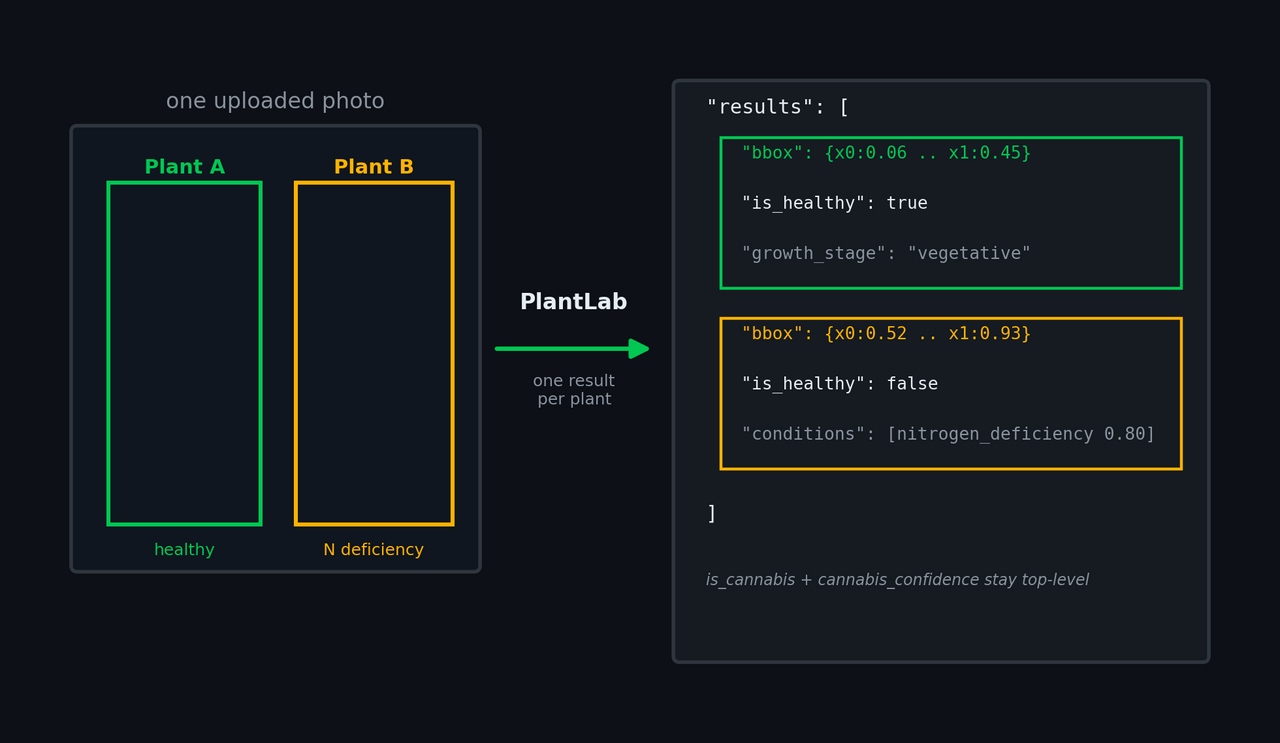
PlantLab can now analyze more than one plant in a single uploaded photo. Instead of forcing the whole image into one diagnosis, the API finds the separable plants, diagnoses each one on its own, and returns a results[] array with one entry per plant.
This is a breaking API change. The response schema is now 3.0.0. Fields like is_healthy, growth_stage, conditions, pests, and reliability_score moved out of the top level and into results[]. Image-level fields such as is_cannabis and cannabis_confidence stay top-level.
If your code already treats a diagnosis as “the answer for this plant,” the migration is simple: iterate results[]. Single-plant photos still return exactly one result.
Why this had to change
Most plant diagnosis tools assume one photo equals one plant.
That is convenient for an API contract. It is not how people take grow-room photos.
Growers send canopy shots. They send side-by-side plants from the same tray. They send one wide image because it is faster than taking six separate photos. Sometimes one plant is healthy and the plant beside it is showing early deficiency. Sometimes the left side of a tent is getting different airflow or light intensity than the right side.
The old PlantLab response could only represent one diagnosis. If the image contained three plants, the model still had to answer as if it were looking at one object. That creates two bad outcomes.
First, the answer can become a blend. A healthy plant and a deficient plant in the same frame can collapse into a single diagnosis that is not quite true for either plant.
Second, the UI has no place to show location. Even when the model found the right problem, it could not say “this plant, in this part of the image.” For automation and history, that is a real limitation. A diagnosis without a region is hard to compare over time.
The fix was not another confidence field. It was a different shape of response.
What changes for growers
When the photo contains one plant, the experience should feel the same. PlantLab returns one diagnosis, with a full-image bounding box:
"results": [
  {
    "bbox": { "x0": 0, "y0": 0, "x1": 1, "y1": 1, "normalized": true },
    "is_healthy": false,
    "growth_stage": "flowering",
    "conditions": [
      { "class_id": "magnesium_deficiency", "confidence": 0.85 }
    ],
    "reliability_score": 0.87
  }
]
When the photo contains multiple separable plants, PlantLab returns multiple entries. Each entry has its own normalized bounding box and its own diagnosis fields:
{
  "schema_version": "3.0.0",
  "success": true,
  "is_cannabis": true,
  "cannabis_confidence": 0.99,
  "results": [
    {
      "bbox": { "x0": 0.06, "y0": 0.12, "x1": 0.45, "y1": 0.92, "normalized": true },
      "is_healthy": true,
      "health_confidence": 0.91,
      "growth_stage": "vegetative"
    },
    {
      "bbox": { "x0": 0.52, "y0": 0.10, "x1": 0.93, "y1": 0.95, "normalized": true },
      "is_healthy": false,
      "health_confidence": 0.88,
      "growth_stage": "vegetative",
      "conditions": [
        { "class_id": "nitrogen_deficiency", "confidence": 0.80 }
      ],
      "reliability_score": 0.83
    }
  ]
}
The boxes are normalized x0, y0, x1, y1 coordinates in the original image. They are designed for overlays, history views, and automation clients that need to keep a result tied to the plant it came from.
The original uploaded image stays the canonical image. PlantLab does not store a separate cropped image for each plant as the primary record. The boxes are metadata attached to the original frame.
Why the response is an array, not plant_1, plant_2, plant_3
Arrays are boring. That is why they are the right answer.
A grow tent can have one plant today and four plants next week. A user can upload a single close-up, then a wide tray shot, then a photo where the plants overlap too much to split safely. The API should not need new field names for each case.
With results[], the contract is stable:
len(results) == 1: use it like the old response.len(results) > 1: show a plant selector or iterate through every result.- Each result carries its own
bbox.
This also makes the API easier for automation systems. If you are feeding PlantLab into Home Assistant, Node-RED, a dashboard, or a cultivation controller, each plant result is a normal object. You can pick the first plant for backward-compatible behavior, show a plant count, or build a UI that lets the user choose which plant they care about.
The PlantLab Home Assistant integration has already been updated for this shape. Version 0.7.0 reads schema 3.0.0, keeps the existing sensors pointed at the primary plant (results[0]), and adds sensor.plantlab_plant_count so automations can tell when the last frame held more than one plant.
What changed for API consumers
Before schema 3.0.0, diagnosis fields were top-level:
{
  "schema_version": "2.1.0",
  "success": true,
  "is_cannabis": true,
  "cannabis_confidence": 0.99,
  "is_healthy": false,
  "growth_stage": "flowering",
  "conditions": [
    { "class_id": "magnesium_deficiency", "confidence": 0.85 }
  ],
  "reliability_score": 0.91
}
In schema 3.0.0, those diagnosis fields live inside results[]:
{
  "schema_version": "3.0.0",
  "success": true,
  "is_cannabis": true,
  "cannabis_confidence": 0.99,
  "results": [
    {
      "bbox": { "x0": 0, "y0": 0, "x1": 1, "y1": 1, "normalized": true },
      "is_healthy": false,
      "growth_stage": "flowering",
      "conditions": [
        { "class_id": "magnesium_deficiency", "confidence": 0.85 }
      ],
      "reliability_score": 0.91
    }
  ]
}
Migration pattern:
const primaryPlant = response.results?.[0]

if (primaryPlant?.is_healthy === false) {
  for (const condition of primaryPlant.conditions ?? []) {
    console.log(condition.class_id, condition.confidence)
  }
}
If your integration displays only one diagnosis, start with results[0]. That gives you a safe primary-plant path while you add richer multi-plant UI later.
If your integration can display multiple plants, iterate the array and draw each bbox over the original image.
If you use the official Home Assistant integration, update to v0.7.0. It is rollout-friendly: the updated integration understands the new results[] response, but it also falls back to the old flat fields when talking to a pre-3.0.0 API. That means you can update Home Assistant before the API flips without breaking existing sensors. Older integration versions should be upgraded before you depend on schema 3.0.0.
Why I made it breaking
I considered keeping the old top-level fields for one release and adding results[] beside them. That sounds friendlier until the two disagree.
Imagine an image with two plants:
- Plant A is healthy.
- Plant B has a deficiency.
What should the old top-level is_healthy say? If it says false, the healthy plant is wrong. If it says true, the deficient plant is wrong. If it tries to summarize the whole image, it stops being the same field that integrators already rely on.
Keeping both contracts would make the API easier to call and harder to trust. I would rather force one clear migration than leave stale fields around for months.
So the schema version bumped to 3.0.0. Consumers must read results[].
What PlantLab does when the image is messy
Multi-plant analysis is only useful when the plants can be separated cleanly enough to diagnose.
Dense canopy shots are hard. Touching plants, heavy overlap, blur, and poor lighting can make a crop ambiguous. Splitting too aggressively is worse than under-splitting, because an over-split can create contradictory diagnoses from pieces of the same plant.
PlantLab uses a conservative policy:
- If the image looks like one plant, return one result.
- If the plants are separable, return one result per plant.
- If the scene is too dense or ambiguous, prefer one safer result over several questionable crops.
- Cap the number of plant crops so latency stays bounded.
That last part matters. A multi-plant image first finds the separable plants, then diagnoses each one. Latency scales with the plants you actually sent, so a busy tray costs more than a single close-up, but it stays bounded.
The point is not to pretend every canopy photo is solvable. The point is to make the output honest about the structure of the image.
What this unlocks
For growers, this makes wide shots more useful. You can upload a photo of a tray and see which plant the diagnosis belongs to.
For paid history, bounding boxes make comparison over time more meaningful. A diagnosis can be stored with the region it came from instead of being attached only to the original image.
For automation, the response is finally shaped like the thing it describes. A controller can loop over plants, display per-plant state, or decide to alert only when any plant crosses a threshold.
For accuracy, this removes a bad compromise. A single answer for a mixed tray was always a blend – one plant's problem averaged against the plant next to it that was fine. One result per plant means each diagnosis is about one plant, not a committee vote across the whole frame.
This is the main reason I was willing to break the schema. The old response was simpler, but it encoded the wrong assumption.
Migration checklist
If you maintain a PlantLab client, check these paths:
- Replace reads of top-level
is_healthy,health_confidence,growth_stage,conditions,pests,mulders_hypotheses, reasoning fields, andreliability_scorewith reads fromresults[]. - Keep reading top-level
is_cannabisandcannabis_confidence. - Treat
results[0]as the primary plant if you need backward-compatible behavior. - Use
len(results)as the plant count. - Draw
result.bboxover the original uploaded image if your UI supports overlays. - Treat
{x0:0, y0:0, x1:1, y1:1}as the whole-image fallback box. - If you use Home Assistant, update
plantlab-ai/home-assistant-plantlabtov0.7.0. Existing diagnosis sensors continue to show the primary plant, and the newsensor.plantlab_plant_countexposeslen(results).
The full OpenAPI schema is available in the PlantLab docs at plantlab.ai/docs.
PlantLab is free to try at plantlab.ai. Three diagnoses a day, structured JSON responses, and API docs built for automation clients.
FAQ
Does every upload now return multiple plants?
No. Single-plant images return one result. Ambiguous dense canopy images may also return one result if splitting would be unsafe.
Did the old fields disappear?
Yes. Per-plant diagnosis fields moved into results[] in schema 3.0.0. Top-level is_cannabis and cannabis_confidence remain image-level fields.
How do I get the plant count?
Use response.results.length.
Are the bounding boxes pixel coordinates?
No. They are normalized coordinates from 0 to 1, relative to the original image. Multiply by image width and height when drawing overlays.
What should older clients do?
Read results[0] first. That restores the old “one diagnosis” behavior while keeping your code compatible with multi-plant uploads.
Is the Home Assistant integration ready?
Yes. The official Home Assistant integration is updated in v0.7.0. It reads schema 3.0.0, surfaces the primary plant through the existing sensors, adds sensor.plantlab_plant_count, and still tolerates pre-3.0.0 flat API responses during rollout.